> ## Documentation Index
> Fetch the complete documentation index at: https://ionq-deuley-20250415-backends.mintlify.site/llms.txt
> Use this file to discover all available pages before exploring further.
# Using native gates with Qiskit
> Learn how to use our hardware-native gateset to run a circuit with Qiskit
This guide covers how to use IonQ's native gates in Qiskit. To learn more about what the native gates are and when to use them, refer to our guide on [getting started with native gates](/guides/getting-started-with-native-gates).
## Introduction
Building and submitting circuits using IonQ's hardware-native gateset enables you to bypass our compiler and optimizer, providing more control and transparency than the default abstract gateset (though often at the cost of performance and convenience).
Before working with native gates in Qiskit, we recommend reviewing our guides on [Getting Started with Native Gates](/guides/getting-started-with-native-gates) and [Getting Started with Qiskit](/sdks/qiskit/index). Native gates are also supported in the [IonQ API](/api-reference/v0.3/native-gates-api), [Cirq](/sdks/cirq/native-gates-cirq), and [PennyLane](/sdks/pennylane/native-gates-pennylane).
Note that the first few code examples in this section highlight specific components of native gate workflows. For end-to-end code snippets that you can copy-paste and run directly, skip to the [full code examples](/sdks/qiskit/native-gates-qiskit#full-code-examples) section below.
This is an advanced-level feature. Using the hardware-native gate interface without a thorough understanding of quantum circuits is likely to result in less-optimal circuit structure and worse algorithmic performance overall than using our abstract gate interface.
***
## Building circuits with native gates
Native gate circuit construction is supported as of `v0.3.1` of the [Qiskit IonQ Provider](https://github.com/qiskit-community/qiskit-ionq).
Gates are provided as part of the `qiskit-ionq` package, including:
* `GPIGate(phi)`
* `GPI2Gate(phi)`
* `MSGate(phi0, phi1, theta=0.25)` for Aria systems
* `ZZGate(theta)` for Forte systems
```python
# Import circuit and gate definitions
from qiskit import QuantumCircuit
from qiskit_ionq import GPIGate, GPI2Gate, MSGate, ZZGate
```
For more details about these gate definitions and parameters, refer to the [native gates guide](/guides/getting-started-with-native-gates#introducing-the-native-gates).
The parameters in the IonQ native gate specification are always defined in *turns*, not in radians. One turn is 2π radians.
To add these gates to a circuit, use Qiskit's `circuit.append()` method:
```python
# Initialize the quantum circuit
circuit = QuantumCircuit(2, 2)
# Add gates (remembering that parameters are in turns, not radians)
circuit.append(MSGate(0, 0), [0, 1])
circuit.append(GPIGate(0), [0])
circuit.append(GPI2Gate(1), [1])
circuit.measure([0, 1], [0, 1])
circuit.draw()
```
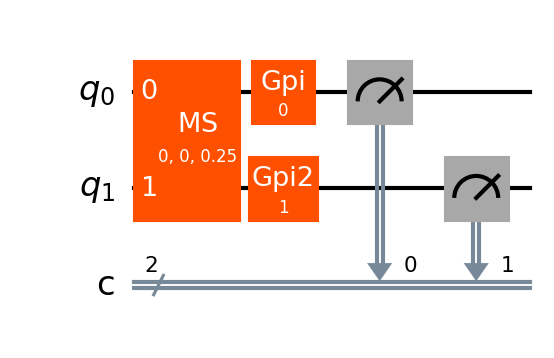
Note that Qiskit also defines MS and ZZ gates in `qiskit.circuit.library`, but these gates are *not* equivalent to the IonQ native gates. To build a circuit in IonQ native gates, make sure you're using the gates imported from `qiskit_ionq`.
For a complete code example including circuit submission, skip to the [full code examples](/sdks/qiskit/native-gates-qiskit#full-code-examples) below.
***
## Transpiling a circuit to native gates
Converting a circuit to native gates with Qiskit's transpilation is supported as of `v0.5.1` of the [Qiskit IonQ Provider](https://github.com/qiskit-community/qiskit-ionq).
Start with the usual imports, plus Qiskit's `transpile()` method:
```python
from qiskit import QuantumCircuit, transpile
from qiskit_ionq import IonQProvider
```
Build a quantum circuit using the abstract (QIS) gateset:
```python
qc_abstract = QuantumCircuit(2, 2, name="hello world, native gates")
qc_abstract.h(0)
qc_abstract.cx(0, 1)
qc_abstract.measure([0, 1], [0, 1])
qc_abstract.draw()
```
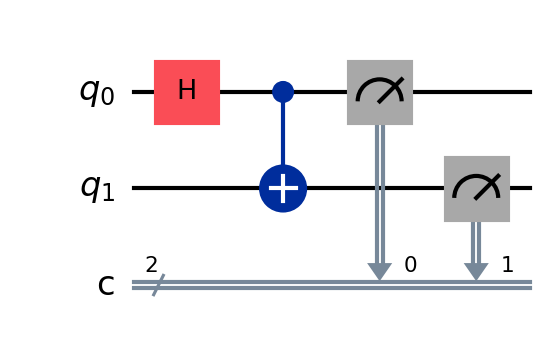
Next, set up an `IonQProvider` and backend, using `gateset="native"`. Qiskit's transpiler can use the target gateset defined by this backend.
```python
provider = IonQProvider()
backend_native = provider.get_backend("simulator", gateset="native")
```
Finally, use Qiskit's `transpile()` method and the native-gates backend to convert the circuit to IonQ's native gateset:
```python
qc_native = transpile(qc_abstract, backend=backend_native)
qc.draw()
```
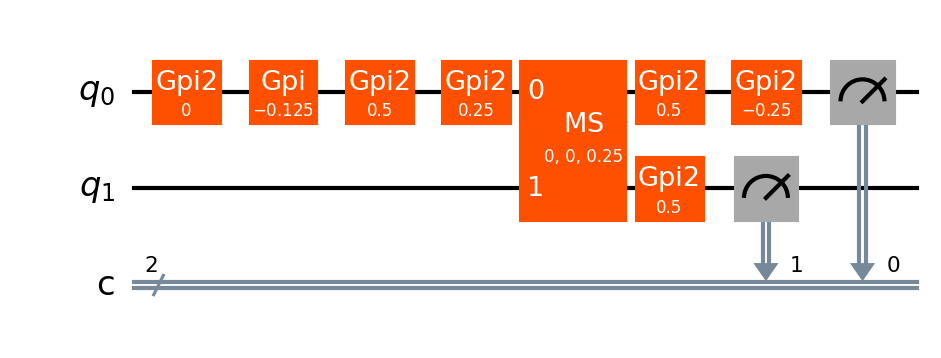
Here, we can see that the Hadamard and CNOT gates in the original circuit were converted into a series of GPI2 gates and one MS gate.
For a complete code example including circuit submission, skip to the [full code examples](/sdks/qiskit/native-gates-qiskit#full-code-examples) below.
***
## Submitting a circuit that uses native gates
Whether you built a circuit in native gates originally, or you built a circuit in abstract gates and transpiled it with Qiskit, you'll need to submit it to an IonQ backend that was set up with the native gateset. Circuits submitted this way will bypass IonQ's compiler and optimizer.
Set up an IonQ backend and specify the native gateset: here, we'll use the ideal simulator, but you can also use the noisy simulator or an IonQ QPU.
This tells the backend to expect circuits defined in native gates, and to bypass IonQ's compiler and optimizer. With the default setting, `gateset="qis"`, the backend will expect circuits defined in abstract gates.
```python
provider = IonQProvider()
backend_native = provider.get_backend("simulator", gateset="native")
```
After you define a quantum circuit `qc_native`, either by building it in native gates directly or building it in abstract gates and then transpiling it, you can submit it to the native gate backend:
```python
job_native = backend_native.run(qc_native, shots=1000)
```
Each quantum circuit submitted to the IonQ Cloud must use a consistent gateset throughout--you cannot mix and match native gates and abstract gates in the same circuit.
For a complete code example including circuit construction, continue to the [full code examples](/sdks/qiskit/native-gates-qiskit#full-code-examples) below.
***
## Full code examples
These examples put together the pieces from the above sections to show two different complete workflows: one for building a circuit in native gates and submitting it to IonQ's simulator; one for building a different circuit in abstract gates, transpiling it via Qiskit, and submitting it to IonQ's simulator.
```python Build in native gates and run
from qiskit import QuantumCircuit
from qiskit_ionq import IonQProvider
from qiskit_ionq import GPIGate, GPI2Gate, MSGate, ZZGate
# Set up an IonQ backend to use native gates
provider = IonQProvider()
backend_native = provider.get_backend("simulator", gateset="native")
# Initialize a quantum circuit
circuit = QuantumCircuit(2, 2, name="build in native gates")
# Add gates (remember that parameters are in turns, not radians)
circuit.append(MSGate(0, 0), [0, 1])
circuit.append(GPIGate(0), [0])
circuit.append(GPI2Gate(1), [1])
circuit.measure([0, 1], [0, 1])
# Run the circuit on the native gates backend
job = backend_native.run(circuit, shots=1000)
# Print results
print(job.get_counts())
```
```python Build in abstract gates, transpile, and run
from qiskit import QuantumCircuit, transpile
from qiskit_ionq import IonQProvider
# Set up an IonQ backend to use native gates
provider = IonQProvider()
backend_native = provider.get_backend("simulator", gateset="native")
# Build a circuit using abstract gates
qc_abstract = QuantumCircuit(2, 2, name="transpile native gates")
qc_abstract.h(0)
qc_abstract.cx(0, 1)
qc_abstract.measure([0, 1], [0, 1])
# Transpile the circuit to native gates
qc_native = transpile(qc_abstract, backend_native)
# Run the circuit on the native gates backend
job = backend_native.run(qc_native, shots=1000)
# Print results
print(job.get_counts())
```
***
## Additional resources
* [Getting Started with Native Gates](/guides/getting-started-with-native-gates)
* [Getting Started with Qiskit](/sdks/qiskit/index)